
Smartphone videography has become increasingly popular in recent years, thanks to the advancements in smartphone camera technology. With the ability to shoot high-quality videos on the go, many content creators, vloggers, and filmmakers are turning to their smartphones as their primary video recording device. The convenience and portability of smartphones make them an ideal tool for capturing moments and creating engaging content. Whether you’re a beginner looking to dip your toes into videography or a seasoned professional looking for a more portable option, smartphone videography offers a versatile and accessible way to capture stunning visuals.
The key to creating professional-looking videos with your smartphone lies in understanding the various accessories and techniques available to enhance your footage. From stabilization accessories to external microphones, lenses, lighting equipment, and editing apps, there are numerous tools and resources at your disposal to take your smartphone videography to the next level. In this article, we’ll explore some of the essential accessories and techniques for smartphone videography, as well as storage and backup solutions for managing your video files.
Stabilization Accessories for Smooth Shots
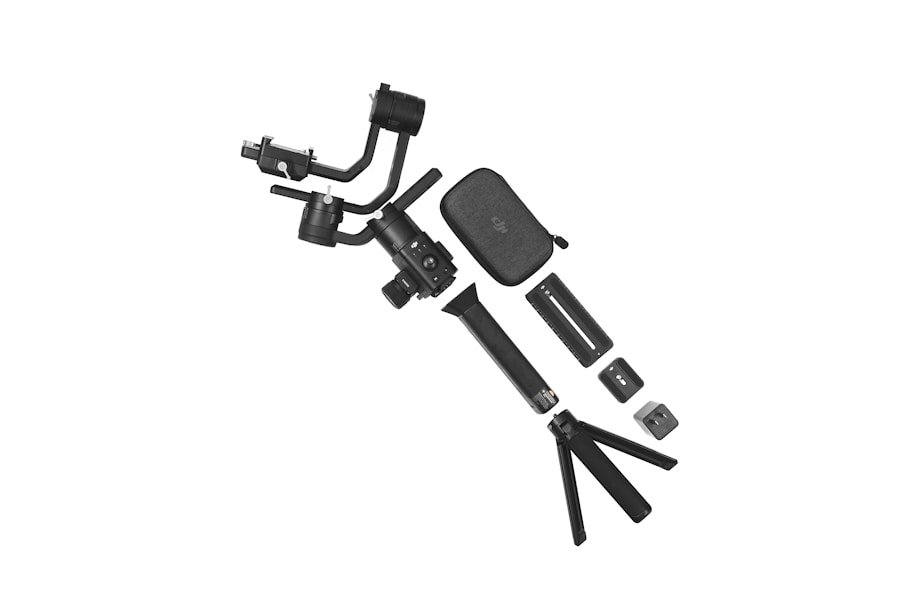
One of the biggest challenges of shooting videos with a smartphone is achieving smooth and stable footage, especially when shooting handheld. Shaky footage can detract from the overall quality of your videos, making them look amateurish and unprofessional. To combat this issue, there are a variety of stabilization accessories available for smartphones that can help you achieve smooth and steady shots. One popular option is a handheld gimbal, which uses motors and sensors to stabilize your smartphone and eliminate unwanted camera movements. Gimbals are particularly useful for capturing dynamic shots such as panning, tilting, and tracking movements, and can greatly improve the overall production value of your videos.
Another option for stabilizing your smartphone footage is a tripod or a monopod. These accessories provide a stable base for your smartphone, allowing you to capture steady shots without the need for handheld operation. Tripods are especially useful for static shots or time-lapse videos, while monopods offer more flexibility and mobility for shooting on the go. Additionally, there are also handheld stabilizers and rigs designed specifically for smartphones, which provide a more ergonomic grip and additional stability for handheld shooting. By investing in a quality stabilization accessory, you can significantly improve the overall look and feel of your smartphone videos.
External Microphones for Improved Audio Quality
While smartphones are capable of capturing high-quality video footage, their built-in microphones often fall short when it comes to recording audio. Poor audio quality can detract from the overall viewing experience and diminish the impact of your videos, making it essential to invest in an external microphone for improved audio recording. There are several types of external microphones available for smartphones, each designed to suit different recording scenarios and environments. For general-purpose recording, a lavalier microphone (also known as a lapel mic) is a popular choice, as it can be clipped onto clothing or positioned close to the subject for clear and natural-sounding audio.
Another option for capturing high-quality audio with your smartphone is a shotgun microphone, which is designed to pick up sound from a specific direction while rejecting unwanted noise from the surroundings. Shotgun microphones are ideal for capturing dialogue or interviews in noisy environments, as they can help isolate the subject’s voice and minimize background noise. Additionally, there are also handheld microphones and wireless microphone systems available for smartphones, which offer greater flexibility and control over audio recording. By investing in an external microphone for your smartphone, you can ensure that your videos have clear and professional-sounding audio to complement the visual content.
Lenses for Creative Visual Effects
In addition to stabilization accessories and external microphones, lenses are another essential tool for enhancing the visual quality of your smartphone videos. While smartphone cameras have become increasingly advanced in recent years, they still have limitations when it comes to optical zoom, depth of field, and creative visual effects. By investing in a set of external lenses for your smartphone, you can expand its capabilities and achieve a wider range of creative possibilities. There are several types of lenses available for smartphones, each designed to achieve different visual effects and enhance the overall image quality.
One popular type of lens for smartphone videography is a wide-angle lens, which allows you to capture a broader field of view and fit more into the frame. Wide-angle lenses are particularly useful for shooting landscapes, architecture, group shots, and immersive storytelling, as they can add depth and dimension to your videos. Another popular option is a macro lens, which enables you to capture close-up details and intricate textures with stunning clarity. Macro lenses are ideal for capturing small subjects such as flowers, insects, food, and other intricate details that may be overlooked with a standard smartphone camera.
Additionally, there are also telephoto lenses available for smartphones, which provide optical zoom capabilities and allow you to capture distant subjects with greater detail and clarity. Telephoto lenses are ideal for capturing wildlife, sports events, concerts, and other scenarios where getting physically close to the subject may not be feasible. By investing in a set of external lenses for your smartphone, you can expand its creative potential and achieve professional-looking visual effects that were previously out of reach.
Lighting Equipment for Professional-looking Videos
Lighting plays a crucial role in videography, as it can greatly impact the overall look and feel of your videos. While smartphones are equipped with built-in flash and LED lights, they often fall short when it comes to providing consistent and flattering lighting for video recording. To overcome this limitation, there are various lighting equipment options available for smartphones that can help you achieve professional-looking videos with enhanced visual appeal. One popular option is an LED ring light, which provides soft and even illumination for capturing well-lit and flattering portraits or close-up shots.
LED ring lights are particularly useful for vloggers, beauty influencers, and content creators who rely on high-quality lighting to enhance their on-camera appearance. Additionally, there are also portable LED panel lights available for smartphones, which offer adjustable brightness and color temperature settings to suit different shooting scenarios. LED panel lights are ideal for illuminating larger scenes or subjects with consistent and natural-looking light, making them a versatile lighting solution for various video recording situations.
Another option for enhancing the lighting quality of your smartphone videos is a portable softbox or diffuser, which can help soften harsh shadows and create a more flattering lighting environment. Softboxes are particularly useful for indoor shooting or controlled lighting setups, as they can help create a more professional and polished look for your videos. By investing in quality lighting equipment for your smartphone videography setup, you can ensure that your videos have consistent and visually appealing lighting that enhances the overall production value.
Editing Apps and Software for Polishing Your Footage
Once you’ve captured your video footage with your smartphone and enhanced it with stabilization accessories, external microphones, lenses, and lighting equipment, the next step is to edit and polish your footage to achieve a professional-looking final product. Fortunately, there are numerous editing apps and software available for smartphones that offer powerful tools and features to help you refine your videos with ease. Whether you’re looking to trim clips, add transitions, apply color correction, or incorporate visual effects, there are editing solutions tailored specifically for smartphone videography that can help you achieve your desired results.
One popular editing app for smartphones is Adobe Premiere Rush, which offers a user-friendly interface and a wide range of editing tools to help you create polished videos on the go. With features such as multi-track editing, customizable titles, color grading presets, and audio mixing capabilities, Adobe Premiere Rush provides a comprehensive editing solution for content creators looking to refine their smartphone footage with professional results. Additionally, there are also other editing apps available for smartphones such as iMovie, Kinemaster, LumaFusion, and FilmoraGo that offer similar features and functionality to help you achieve polished and visually engaging videos.
In addition to editing apps designed specifically for smartphones, there are also desktop-based editing software options available that offer more advanced features and capabilities for refining your smartphone footage. Software such as Adobe Premiere Pro, Final Cut Pro X, DaVinci Resolve, and Avid Media Composer provide powerful editing tools and professional-grade features to help you achieve cinematic results with your smartphone videos. By investing in quality editing apps or software for polishing your smartphone footage, you can take your videography skills to the next level and create visually stunning videos that captivate your audience.
Storage and Backup Solutions for Managing Your Video Files
As you continue to capture high-quality video footage with your smartphone and refine it with various accessories and editing tools, it’s essential to have a reliable storage and backup solution in place to manage your video files effectively. Smartphone videography often generates large amounts of data that can quickly fill up your device’s storage capacity, making it crucial to have a system in place for organizing, storing, and backing up your video files. There are several storage options available for managing your video files on smartphones, each offering different levels of capacity, portability, and accessibility.
One popular storage solution for managing video files on smartphones is cloud storage services such as Google Drive, Dropbox, iCloud, or OneDrive. Cloud storage offers the convenience of accessing your video files from any device with an internet connection while providing secure backup options to protect your data from loss or corruption. Additionally, there are also portable external hard drives or solid-state drives (SSDs) available that offer high-capacity storage options for managing large video files on the go.
External storage devices provide the flexibility of expanding your smartphone’s storage capacity while offering fast data transfer speeds for efficient file management. Furthermore, there are also wireless storage solutions available that allow you to wirelessly transfer and access video files from your smartphone without the need for physical connections. By investing in a reliable storage and backup solution for managing your video files on smartphones, you can ensure that your data is secure and accessible whenever you need it.
In conclusion, smartphone videography offers a versatile and accessible way to capture stunning visuals with the convenience of a portable device. By understanding the various accessories and techniques available to enhance your smartphone videography skills – including stabilization accessories, external microphones, lenses, lighting equipment, editing apps/software – as well as storage solutions – you can take your videography skills to the next level and create professional-looking videos that captivate your audience. Whether you’re a beginner looking to explore the world of videography or a seasoned professional seeking a more portable option for capturing moments on the go – smartphone videography provides endless possibilities for creativity and storytelling. With the right tools at your disposal – including high-quality accessories and reliable storage solutions – you can elevate your smartphone videography skills and create visually stunning videos that leave a lasting impression on your audience.